Your bio page is the highest-intent traffic you own on social media. Every person who taps that link chose to leave the feed and visit your page. They're interested. They're curious. Some of them are ready to buy.
And 97% of them leave without purchasing a thing.
That's not a guess. The average ecommerce conversion rate hovers between 2% and 3% [1]. For every 1,000 visitors who land on your bio page, roughly 970 will browse, maybe tap a product or two, and disappear. Without retargeting pixels installed on your bio page, those 970 people are gone forever. You can't show them an ad. You can't remind them about the product they lingered on. You can't build a lookalike audience from their behavior. They're just gone.
Retargeting pixels on a bio page are small JavaScript snippets that fire when someone visits your page, recording that visit so you can serve those visitors targeted ads later on platforms like Facebook, Instagram, Google, TikTok, and LinkedIn. Installing them takes about five minutes. The revenue impact compounds every single month.
This guide covers all four major pixel platforms, how to set each one up, the ad strategies that actually work for bio page retargeting, and the hard revenue math that makes the case impossible to ignore.
Why 97% of Bio Page Visitors Are Lost Forever (Without Pixels)
Let's be direct about what's happening every day you run a bio page without retargeting pixels.
Social media bio page traffic is uniquely valuable. Unlike someone who stumbles onto your site from a random Google search, a bio page visitor has already engaged with your content. They've seen your posts or Reels, decided they want to learn more, and actively tapped your link. That's a self-selected audience with genuine purchase intent. According to Shopify's own data, social commerce conversion rates can reach 2x higher than cold traffic when visitors are retargeted within 24 hours [2].
But first-visit conversion rates are stubbornly low. Even with the best product page in the world, a 3% conversion rate is considered solid for ecommerce. The other 97% aren't necessarily uninterested. They might be browsing on their commute. They might need to check their bank balance first. They might fully intend to come back later and simply forget. Retargeting pixels solve exactly this problem by letting you re-engage those visitors with ads across the platforms they use most.
Without pixels installed, you lose three things that matter enormously for scaling an ecommerce business.
First, you lose your retargeting audience entirely. Every visitor who doesn't buy on the first tap becomes invisible to your ad accounts. You cannot show them product reminder ads, testimonial ads, or limited-time offers. They're unrecoverable.
Second, you lose the ability to build lookalike audiences. Platforms like Meta and TikTok can analyze the behavioral profile of your bio page visitors and find similar users who haven't discovered your brand yet. This is one of the most cost-effective prospecting tools in paid advertising, and it depends on having pixel data to seed the model.
Third, you lose attribution clarity. Without pixels, you have no idea which social platform is actually driving revenue. You might be spending $500/month on TikTok ads because your TikTok bio gets the most clicks, while your Instagram audience quietly converts at 3x the rate. Pixels close the loop between bio page visits and actual purchases, so you can allocate ad spend to what's working.
For a deeper look at why bio page analytics matter for ecommerce sellers, see our complete link-in-bio ecommerce guide.
Which Pixels to Install (and Why All 4 Matter)
Most guides on this topic only cover Meta Pixel. That's a mistake. Each ad platform reaches different audiences at different moments in their buying journey, and running all four simultaneously gives you the widest retargeting net possible.
Meta Pixel (Facebook + Instagram)
Meta's advertising network reaches over 3.3 billion monthly active users across Facebook and Instagram [3]. For ecommerce sellers, it remains the single most powerful retargeting platform. The Meta Pixel (formerly Facebook Pixel) fires when someone visits your bio page, creating a custom audience you can target with product ads, carousel ads, and dynamic retargeting campaigns.
The real power is in the lookalike audiences. Feed Meta enough visitor data (typically 1,000+ pixel events), and it can find new customers who resemble your best bio page visitors with surprising accuracy. If you install only one pixel, make it this one. But don't stop here.
Google Tag (Search, Display, YouTube)
Google's ad network covers over 90% of internet users worldwide through Search, the Display Network, Gmail, and YouTube [4]. A Google Tag on your bio page lets you retarget visitors across all of these surfaces. Someone who visited your bio page from TikTok can see your product ad while searching Google the next morning, or while watching YouTube that evening.
The cross-platform reach is what makes Google Tag essential. Social media retargeting keeps you visible within apps. Google retargeting follows visitors into the rest of their internet usage.
TikTok Pixel
TikTok's advertising platform is the fastest-growing in ecommerce, with ad revenue projected to reach $33.1 billion in 2026 [5]. If you're driving bio page traffic from TikTok (and if you sell physical products, you probably should be), the TikTok Pixel captures those visitors so you can retarget them with in-feed video ads.
TikTok's algorithm is exceptionally good at finding purchase-ready audiences. A retargeting campaign on TikTok targeting previous bio page visitors often outperforms cold campaigns by 2x to 4x on return on ad spend, because the audience already knows your brand.
LinkedIn Insight Tag
LinkedIn is the professional network with over 1 billion members, and its advertising platform is uniquely powerful for B2B sellers, service providers, coaches, and creators targeting professionals [6]. The LinkedIn Insight Tag tracks bio page visitors and lets you retarget them with Sponsored Content, Message Ads, and dynamic ads across LinkedIn's feed.
For categories like consulting, SaaS, online courses, coaching, and professional services, LinkedIn retargeting often delivers higher-value conversions than other platforms because the audience skews toward decision-makers with purchasing authority.
Why Running Multiple Pixels Matters
Here's the practical reality: your customers don't live on one platform. Someone might discover your brand on TikTok, visit your bio page, not buy, then see your retargeting ad on Instagram the next day and purchase. Without pixels on both platforms, you'd either miss the retargeting opportunity entirely or misattribute the conversion.
Running all four pixels simultaneously costs nothing (the pixels themselves are free) and creates four overlapping retargeting audiences from a single bio page visit. It's the highest-leverage five minutes of setup you'll do this month.
Step-by-Step: Adding Retargeting Pixels on Klyqme
Setting up retargeting pixels on your bio page should take under five minutes. Here's exactly how to do it on Klyqme, which supports all four platforms natively.
Step 1: Gather Your Pixel IDs
Before you touch your bio page settings, collect your pixel IDs from each platform:
- Meta Pixel ID: Go to Meta Events Manager and select your pixel. The ID is a 15-16 digit number displayed at the top of the page.
- Google Tag ID: Go to Google Ads, navigate to Tools > Audience Manager > Your data sources. Your Google Tag ID starts with
AW-followed by numbers. - TikTok Pixel ID: Go to TikTok Ads Manager, navigate to Assets > Events > Web Events. Your pixel ID is a string of numbers.
- LinkedIn Insight Tag ID: Go to LinkedIn Campaign Manager, navigate to Analyze > Insight Tag. Your Partner ID is a number displayed in the tag setup instructions.
Step 2: Add Your Pixels at the Team Level
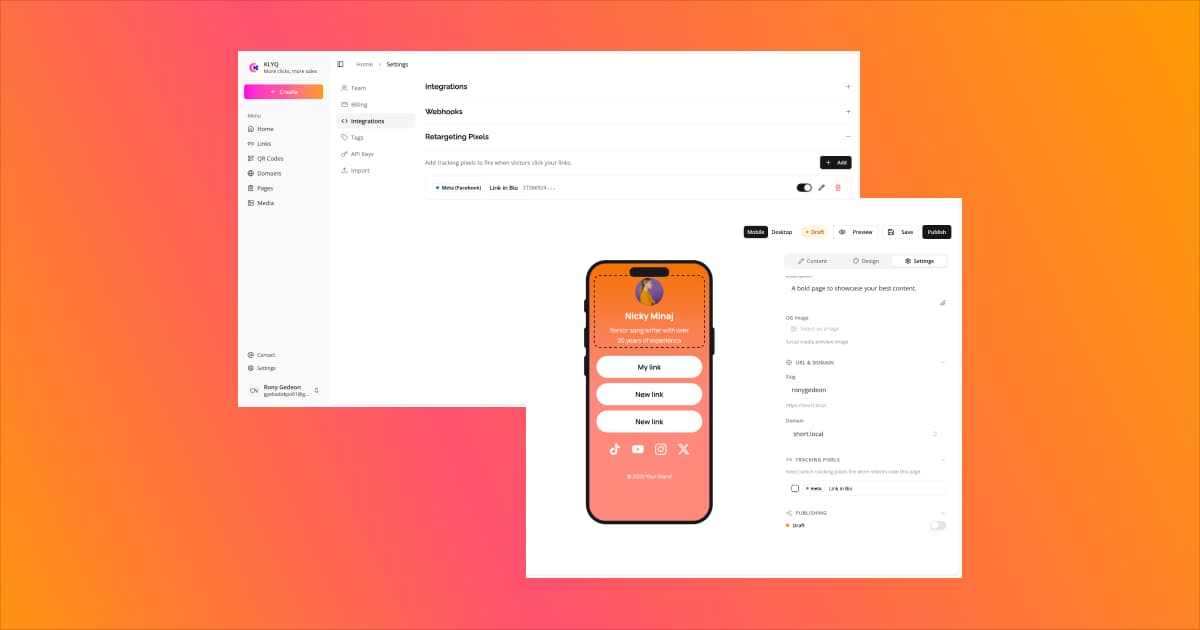
Log in to your Klyqme dashboard and go to Settings → Integrations. Click Add Pixel, select the platform (Meta, Google, TikTok, or LinkedIn), enter a name for it, and paste the pixel ID you collected in Step 1. Click Save. Repeat for each platform you want to use. This registers the pixels at the team level so they're available across all your bio pages.
Step 3: Enable Pixels on Your Bio Page
Open the bio page you want to track. Click the Settings tab in the builder and scroll to the Tracking Pixels section. You'll see the pixels you added in Step 2 listed here. Toggle ON each pixel you want active on this specific page. No code editing required. No script injection. No developer needed.
Step 4: Save and Publish
Click Save, then Publish to push the changes live. Your bio page now fires all four pixels on every visit.
Step 5: Verify Your Pixels Are Working
Verification is important. A misconfigured pixel wastes every visit that fires against it.
For Meta Pixel, install the Meta Pixel Helper Chrome extension. Visit your bio page and confirm the extension shows a green checkmark with your pixel ID.
For Google Tag, use Google Tag Assistant. Enter your bio page URL and confirm the tag fires correctly.
For TikTok Pixel, use the TikTok Pixel Helper Chrome extension. Visit your bio page and verify.
For LinkedIn Insight Tag, use LinkedIn Tag Validation by visiting your bio page while logged into LinkedIn Campaign Manager and checking the Insight Tag status page to confirm it's receiving data.
All green? You're live. Every bio page visitor from this point forward is being added to four retargeting audiences simultaneously.
Set up your pixels now on Klyqme
Retargeting Ad Strategies for Bio Page Visitors
Having the pixels installed is step one. Running effective retargeting campaigns against those audiences is where the revenue materializes.
Product Reminder Ads
The simplest and often most effective strategy. If your bio page features product blocks (which it should, per our guide to selling products from your bio link), your retargeting ads should remind visitors of exactly what they looked at. Show the product image, the price, and a clear call to action. On Meta, dynamic product ads automate this by pulling from your catalog. On TikTok, short video ads featuring the product in use outperform static images by a wide margin.
Social Proof Ads
Visitors who didn't buy on the first visit often need validation. Retarget them with ads featuring customer reviews, user-generated content, or testimonial videos. The message is simple: other people bought this and love it. This works especially well 3-7 days after the initial visit, when the product memory is still fresh but purchase hesitation has set in.
Limited-Time Offer Ads
Create urgency. Retarget bio page visitors with a time-bound discount or free shipping offer that expires in 48 hours. This works best as a second-touch retargeting ad, shown to people who've already seen a product reminder ad but still haven't converted. The discount gives them the final push.
Cross-Platform Retargeting
This is where running all four pixels pays off most dramatically. Someone discovers your brand on TikTok, visits your bio page, and doesn't buy. The TikTok Pixel captures that visit. But instead of (or in addition to) retargeting on TikTok, you retarget them on Instagram through your Meta Pixel audience, where the ad format and context are different. Cross-platform retargeting increases touchpoints without creating ad fatigue on a single platform.
Combine these strategies with A/B testing on your bio page to figure out which product arrangement drives the most pixel events and downstream conversions.
The Revenue Math: What Retargeting Pixels Are Actually Worth
Let's run the numbers on a realistic scenario for a Shopify seller with a moderately active social presence.
Starting assumptions:
- 1,000 bio page visitors per month
- 3% first-visit conversion rate (industry average)
- $50 average order value
- 5% retargeting conversion rate on remaining visitors (conservative for warm audiences [7])
- $0.50 cost per retargeting click (average across Meta and TikTok)
Without retargeting pixels:
1,000 visitors x 3% conversion = 30 purchases. At $50 average order, that's $1,500/month in revenue.
With retargeting pixels:
The remaining 970 non-buyers are now in your retargeting audiences. A well-run retargeting campaign typically reaches 60-70% of a custom audience. So roughly 650 of those 970 visitors see your retargeting ads. At a 5% click-through rate, 32 return to your page. At a 15% conversion rate on retargeting clicks (warm traffic converts significantly higher), that's roughly 5 additional purchases per cycle.
But the compounding effect is the real story. That first retargeting cycle yields 5 additional purchases. Over the course of a month with multiple retargeting touchpoints across four platforms, you'll run several cycles as new ads reach different segments of those 970 visitors. A conservative 3-4 retargeting cycles per month, each recovering a few more buyers, can realistically bring in 15-20 additional purchases. At $50 average order, that's an additional $750-$1,000/month.
Total with retargeting: $2,250-$2,500/month. That's a 50-67% increase from the same traffic.
The cost? Retargeting ads are cheap because the audience is warm. At $0.50 per click and a 15% conversion rate, each retargeting conversion costs about $3.33 in ad spend. For 15-20 additional purchases, you'd spend roughly $50-$67 in ads to generate $750-$1,000 in revenue. That's a 15:1 return on ad spend.
Now multiply that across four platforms, each building its own lookalike audience that brings in net-new customers at the top of the funnel. The flywheel effect is real, and it starts with five minutes of pixel setup.
Why Most Bio Link Tools Can't Do This
Here's the uncomfortable truth: most link-in-bio tools either don't support retargeting pixels at all, or support them so narrowly that the retargeting strategy described above is impossible.
| Feature | Klyqme | Linktree | Beacons | Stan Store | LinkShop |
|---|---|---|---|---|---|
| Meta Pixel | Yes | Pro only ($9/mo) | No | No | No |
| Google Tag | Yes | Pro only ($9/mo) | No | No | No |
| TikTok Pixel | Yes | No | No | No | No |
| LinkedIn Insight Tag | Yes | No | No | No | No |
| Multiple pixels | Yes (all 4 simultaneously) | Meta + Google only | No | No | No |
Linktree is the only other tool on this list that offers any pixel support, and it's limited to Meta Pixel and Google Tag on paid plans ($9/month or higher). TikTok Pixel and LinkedIn Insight Tag? Not available. If you're a Shopify seller running TikTok ads (and in 2026, you probably should be), Linktree leaves a massive gap in your retargeting strategy.
Beacons offers analytics but no retargeting pixel support. Stan Store doesn't support pixels at all. LinkShop, while great for basic Shopify product display, has no tracking capabilities beyond what Shopify's own analytics provide.
Klyqme is the only bio link tool that supports all four pixel platforms natively. For a full comparison of bio link tools built for ecommerce sellers, see our Shopify link-in-bio tools comparison.
See Klyqme pricing and pixel features
Advanced: Meta Conversions API and iOS Privacy Changes
If you're running serious ad spend, two topics deserve attention.
Meta Conversions API (CAPI)
Apple's App Tracking Transparency framework, introduced with iOS 14.5 in 2021, gives users the option to block pixel tracking. Opt-out rates have settled around 75-85% on iOS devices [8]. That means the browser-based Meta Pixel misses the majority of iPhone users visiting your bio page.
Meta's solution is the Conversions API (CAPI), a server-side integration that sends event data directly from your server to Meta, bypassing browser restrictions entirely. CAPI delivers 15-25% more attributed conversions than the browser pixel alone, according to Meta's own case studies [9].
Most bio link tools don't support CAPI because it requires server-side event forwarding. This is on Klyqme's roadmap, and when it launches, it will bring server-side conversion tracking to bio pages. For now, the browser-based Meta Pixel captures the majority of visitors on Android and desktop (which still account for over 50% of social traffic to bio pages), and combining it with the three other platform pixels ensures broad coverage regardless of device.
The Impact on Your Strategy
iOS privacy changes don't eliminate the value of retargeting pixels. They reduce the size of your pixel audiences on iOS, which makes running all four pixel platforms even more important. A visitor who opts out of Meta tracking on their iPhone can still be captured by Google Tag, TikTok Pixel, or LinkedIn Insight Tag if they visit your bio page through a non-iOS browser or if those platforms use different consent mechanisms.
The practical takeaway: install all four pixels, not just Meta. Diversified tracking creates resilience against platform-specific privacy restrictions.
Stop Losing 97% of Your Best Traffic
Your bio page visitors are your warmest social audience. They chose to visit. They're already interested. And without retargeting pixels, every one of them who doesn't buy on the first visit vanishes into the void.
Five minutes of setup. Four pixel platforms. A retargeting net that covers Facebook, Instagram, Google, YouTube, TikTok, and LinkedIn. The math is simple: retargeting pixels turn a 3% conversion rate into something dramatically higher, and the only cost is the ad spend to bring warm visitors back.
Every day without pixels installed is an audience you'll never recover.
Frequently asked questions
Retargeting pixels are small tracking codes installed on your bio page that record visitor activity. When someone visits your page, the pixel fires and adds that visitor to a custom audience on the associated ad platform (Meta, Google, TikTok, or LinkedIn). You can then serve targeted ads to those visitors as they browse other websites and apps, bringing them back to complete a purchase.
On Klyqme, open your bio page, go to the Settings tab, find the Tracking Pixels section, and paste your Meta Pixel ID into the Facebook/Meta field. Save and publish. The pixel fires automatically on every page visit. You can verify it's working using the Meta Pixel Helper Chrome extension. The same process works for adding your Google Tag, TikTok Pixel, and LinkedIn Insight Tag.
Linktree supports Meta Pixel and Google Tag on its Pro plan ($9/month) and above. TikTok Pixel and LinkedIn Insight Tag are not supported on any Linktree plan. If you need all four pixel platforms, Linktree does not currently offer that. Klyqme supports all four platforms natively.
Modern tracking pixels are lightweight, typically 1-2 KB each. Adding all four pixels increases page load by roughly 50-100 milliseconds, which is imperceptible to visitors. Klyqme loads pixels asynchronously, meaning they don't block your page content from rendering. Your visitors see the page instantly while the pixels fire in the background.
Most ad platforms require a minimum audience size to run retargeting campaigns. Meta requires at least 100 people in a custom audience. Google requires 100 for Search and 1,000 for Display. TikTok requires 1,000. LinkedIn requires 300. If your bio page gets at least 30-40 visitors per day, you'll hit these thresholds within a few weeks. Install the pixels now so the audience starts building immediately, even if you don't plan to run retargeting ads until next month.
Klyqme supports all four pixel platforms (Meta, Google, TikTok, LinkedIn) natively. Most competitors either don't support pixels at all or lock them behind paid tiers. Linktree, for example, requires at least the Pro plan ($9/month) for Meta and Google pixels, and doesn't support TikTok or LinkedIn at any price.
Retargeting pixels are subject to the same GDPR and privacy regulations as pixels on any other website. If your visitors are in the EU, you need cookie consent before firing tracking pixels. The specifics depend on your business location and audience; consult your legal advisor for your particular situation.
References
[1] Average Ecommerce Conversion Rate (2025-2026)
[2] Social Commerce and Retargeting Statistics
[3] Meta Platforms Q4 2025 Earnings Report
[4] Google Ads Reach Statistics
[5] TikTok Advertising Revenue Forecast
[6] LinkedIn Advertising Statistics
[7] Retargeting Conversion Benchmarks